
Wix and Airtable Two-Way Sync: Decide Who Owns Each Field
28 September 2026 · 3 min read
Plan a Wix–Airtable member directory with stable record mapping, clear editing rights, conflict rules and recoverable synchronisation.
Your team likes Airtable. Your members need a simple place to update their profiles. Connecting Airtable to a Wix member portal can accommodate both, but two-way sync needs more thought than sending every edit in both directions.
The first design decision is ownership: who may change each field, and what should happen when changes conflict? Answering that makes the integration easier to build and much easier to operate.
Check whether every field needs two-way editing
Two-way sync at the system level does not mean every field must be editable everywhere. A member could own their biography and public website link, while an administrator owns approval status and directory visibility.
That division reduces ambiguity. If both parties genuinely need to edit the same field, decide whether the latest accepted edit wins, whether one system takes priority or whether staff must review a conflict. Make the choice visible to the people using the system.
Start with the smallest shared dataset. Internal notes do not need to travel to a public-facing profile just because they sit in the same Airtable record.
Match records using stable identifiers
A useful mapping links the Wix member, website profile and Airtable record. Names and email addresses can change, so relying on them alone can create duplicates or update the wrong person.
Plan first-time matching and later updates separately. What happens when someone registers with an address already present in Airtable? What happens when a member changes that address? Ambiguous matches should be reviewed, not silently merged.
These are recommended modelling choices. The exact fields depend on your existing base and membership structure.
Separate editing permission from public visibility
A signed-in member should only be able to change authorised fields on an authorised profile. Backend checks must enforce that relationship even if the interface displays only one profile.
The public directory needs a separate definition of what it exposes. Build a deliberate public projection or equivalent controlled response containing approved fields. Do not send private fields to the browser and merely hide them visually.
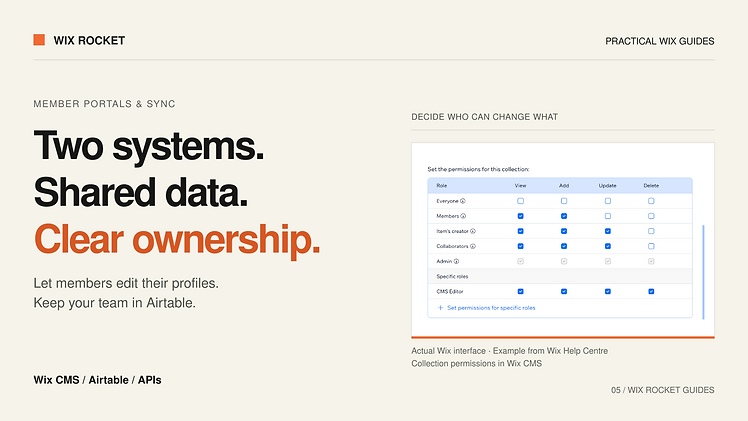
Wix CMS permissions support collection access controls; custom backend operations need corresponding application checks, particularly when using elevated access.
Prevent an update from bouncing forever
Imagine Wix sends an edited biography to Airtable. The Airtable change then triggers a return update to Wix, which triggers another outbound update. Without change detection, a single edit can become a loop.
We recommend recording useful sync metadata such as origin, last-synced values or a version marker. Compare meaningful field changes before writing again. The exact mechanism depends on the available triggers; a scheduled integration and a webhook integration have different timing and recovery needs.
Avoid describing the result as instant unless the implementation supports and measures that promise. A saved profile and a completed cross-system sync can be separate states.
Make failed changes recoverable
Airtable documents API request limits and throttling behaviour. Plan batching and controlled retries around the relevant limits rather than issuing a request for every keystroke. Check the current account plan and API guidance during implementation.
Keep enough information to retry a failed change without asking the member to retype it. Staff should be able to see which records need attention. Deletions also need explicit rules: hiding a public profile is not necessarily permission to erase the administrative record.
A project example: a member-maintained directory
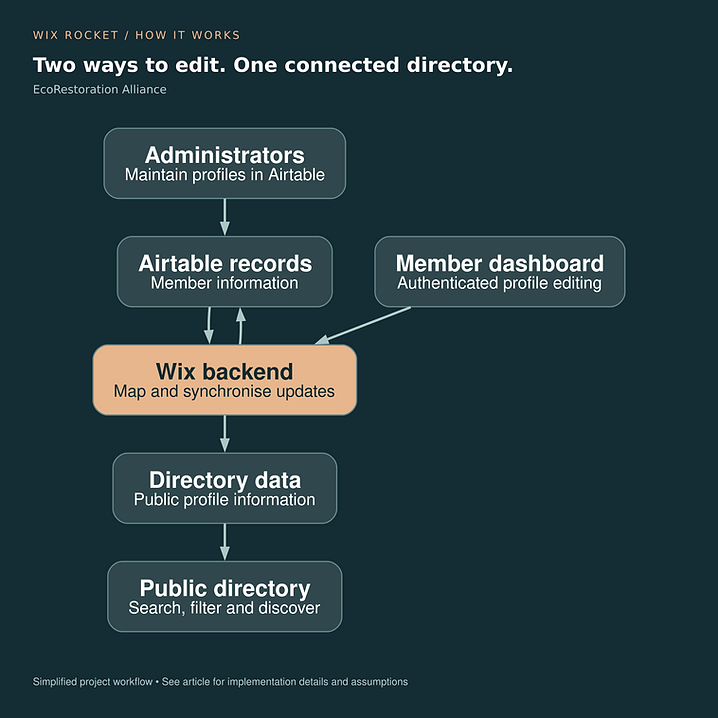
EcoRestoration Alliance used Wix for member editing and a searchable public directory while retaining Airtable for administration, with two-way synchronisation. The diagram illustrates that arrangement. The conflict and recovery strategies above are planning recommendations, not an audit of its internal implementation.
Read the EcoRestoration case study.

Start with a field-ownership workshop
List the fields, permitted editors, public visibility and conflict behaviour before selecting the automation tools. Wix Rocket can help turn that list into a practical portal and sync specification.