
How to Build Personalised Coupon Offers on Wix
11 August 2026 · 3 min read
Connect Wix offer emails, member validation, coupon expiry and checkout so a personalised promotion behaves consistently from click to purchase.

A personalised email is a promising start. The offer stops feeling personal when its link opens a generic page, its countdown resets on refresh or checkout does not recognise the discount.
A coherent Wix promotion connects the recipient, offer conditions and checkout. The timer is only the visible part. Here are the decisions that make the rest of the journey dependable.
Decide what makes the offer personal
A campaign code available to everyone, a unique code issued to a contact and an offer restricted to a particular member are different designs. Choose the one your campaign actually requires.
A unique code makes tracking easier, but uniqueness alone does not prevent someone sharing it. Likewise, a once-per-customer limit does not necessarily restrict redemption to one named recipient. If recipient-only access matters, assess enforcement across the actual redemption routes.
Also confirm which Wix product the offer purchases. Stores, Bookings and Pricing Plans have different purchase journeys; a working coupon flow in one should not be assumed to transfer unchanged to another.
Store an offer record with useful context
A suggested offer record includes the recipient identifier, coupon reference, eligible product or plan, start and end timestamps and current status. Keep it separate from the email body so the page and follow-up process can consult the same information.
Use a stable contact or member identifier where appropriate. Decide what should happen if the recipient signs in with another account or opens the link before joining the site. Explain the required next step rather than exposing a confusing error.
Private offer records should not be available through a publicly readable collection. Backend checks need to confirm the visitor's entitlement before returning member-specific details.
Make expiry a backend rule
Wix coupon APIs expose scheduling and usage conditions. Configure the applicable coupon rules for the chosen purchase flow and keep the offer record aligned with them.
A browser countdown should calculate remaining time from the stored expiry. Refreshing the page should not silently grant another window. Use a consistent timestamp representation and format the deadline clearly for the viewer.
Check eligibility again when starting checkout. Someone can leave a tab open past the expiry time, so a button enabled during the original page load is insufficient validation.
Carry the offer into the right checkout
Where the chosen Wix checkout supports applying the discount programmatically, connect that action to the validated offer. Confirm that the selected product or plan is eligible and show the resulting price before the customer commits.
Test copied codes, shared links and alternative checkout entry points. A protected offer page is only one part of the system if the underlying coupon remains redeemable elsewhere.
Keep payment completion separate from clicking the offer button. Follow-up logic should use the authoritative purchase state so a buyer is not repeatedly invited to purchase something they just bought.
Make follow-ups honest and repeat-safe
If you extend an offer, record the extension deliberately and communicate the new terms. A supposedly final deadline should not quietly restart on every visit.
A repeated signup event should not issue unlimited new offers. Decide whether the existing offer is reused, rejected or replaced, and log the outcome. Also check the relevant communication preferences and message type before adding promotional follow-ups.
A project example: course offers
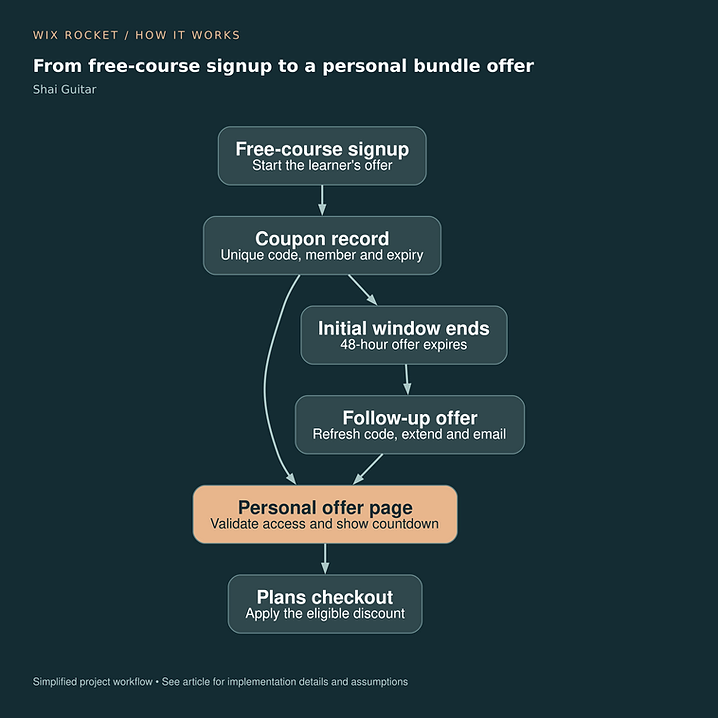
Shai Guitar connected free-course signup to an individual bundle offer, a personal page, a stored expiry and Pricing Plans checkout. Its workflow also included a follow-up extension. The diagram shows that campaign's specific timing; those timings are not a universal recommendation.
Read the Shai Guitar case study.

Test the journey as several different people
Try the intended recipient, another signed-in member, a logged-out visitor and a customer who has already purchased. Repeat the journey before and after expiry. That reveals problems a single successful checkout will miss.
Wix Rocket can help connect the offer's business rules to its emails, page and checkout so the experience stays consistent.