
Can Wix Bookings Handle Parents Booking for Multiple Children?
7 October 2026 · 3 min read
Understand Wix group bookings, reusable child profiles and custom family booking flows, including permissions, capacity and membership decisions.

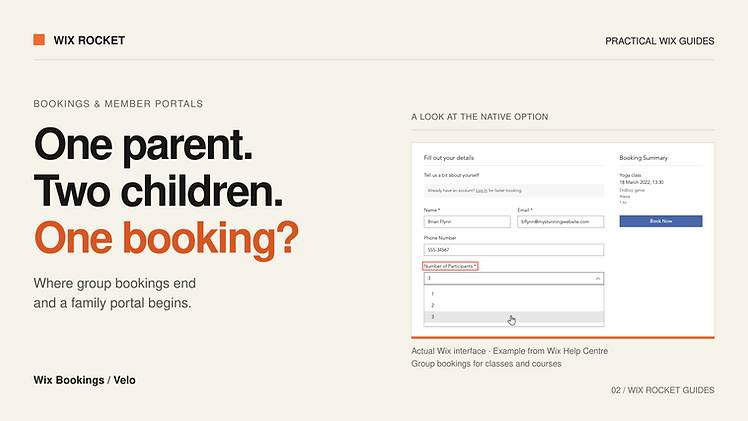
A parent booking two children is making one purchase, but your team may need two participant records. That difference matters when each child has their own programme, attendance history or permissions.
Wix Bookings has native group-booking options. A more detailed family portal can require an additional layer around them. The useful question is which information needs to follow each child beyond today's checkout.
Start with the native group-booking option
Wix documents multiple-participant bookings for classes and courses, with a maximum group size configured in the booking policy. Its current guidance says this option is not available for appointments. If you simply need one customer to reserve several places in a class, explore that configuration first.
Reserving several places and maintaining reusable child profiles solve different problems. Before commissioning custom work, test your exact service, booking form and payment arrangement. Check what your staff can see afterwards and whether that information is sufficient for attendance and follow-up.
When reusable child profiles become useful
Profiles make sense when parents repeatedly enter the same information or book different activities for different children. A possible model links a parent member account to child records, then links each booking to its actual participant.
For example, a family might select Alex for a course and Sam for a coaching appointment. A confirmation addressed to the parent still needs to distinguish who is attending which activity. Agree what happens when profiles change: should an old booking retain the details recorded at booking time?
Only collect the information the service needs. Keep public programme information separate from private participant records, and define which staff roles can view the latter.
Ownership checks belong on the backend
A dropdown containing only a parent's children improves the interface, but it is not an access rule. In a custom implementation, the backend should verify that the signed-in parent is authorised to use the submitted child ID before reading, editing or booking against it.
Wix CMS permissions provide collection-level controls. Your application still needs to enforce the parent-child relationship wherever privileged backend code accesses those records. Test attempts to substitute another profile ID, as well as the normal journey.
Give each activity its own booking rules
A private appointment, recurring class and fixed course should not be forced into identical assumptions. Document capacity, approval, cancellation and payment rules for each. A multi-day camp may also require decisions about whether one selection creates one enrolment or several session bookings.
Membership benefits need their own check. Confirm how the chosen plan or package works with the precise booking journey; do not assume that a benefit automatically extends to every child or every service. Where custom discounts are necessary, calculate eligibility on the backend.
Recheck availability during submission and handle rejection clearly. A slot shown five minutes ago is not a promise. If a payment is interrupted, the parent should be able to discover whether the booking exists before trying again.
A project example: a football academy
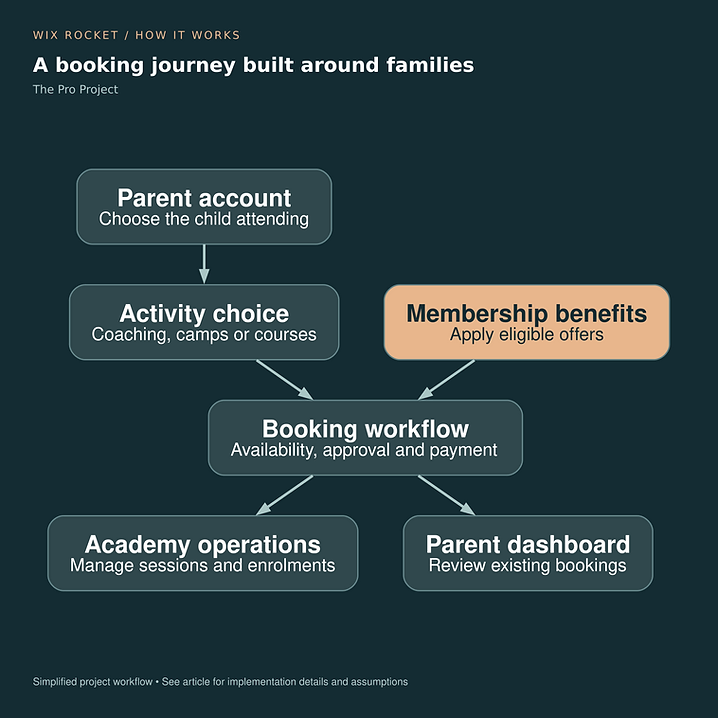
The Pro Project combined parent registration, child profiles, coaching, camps, courses and membership benefits in a custom Wix experience. It is an example of where the family relationship shaped the interface. The diagram shows that project's combined journey, rather than a feature every academy needs.
Read the The Pro Project case study.

Choose the smallest useful custom layer
Begin with one real family scenario and run it through the native setup. Record precisely where information gets repeated, lost or handled by email. Those gaps become the custom scope, while suitable Wix Bookings features remain in place.
Wix Rocket can help assess that journey and decide whether configuration, a custom form or a fuller family portal is justified.