
How to Generate Personalised PDFs from Wix Forms
15 September 2026 · 3 min read
Plan a Wix form-to-PDF workflow: choose templates, map answers, handle payment states and store documents your team can retrieve.
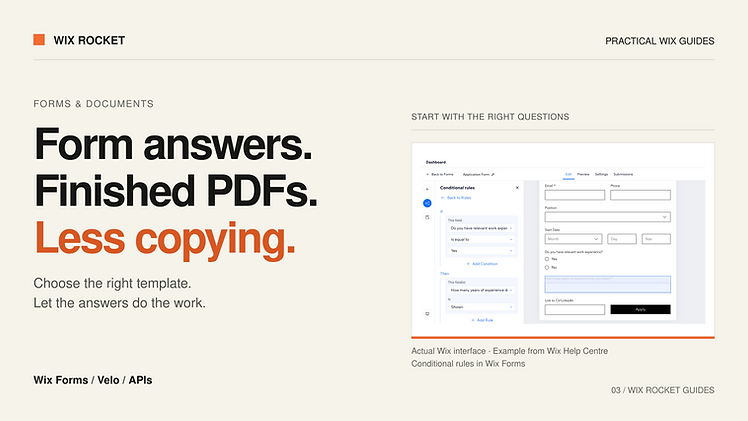
A completed form should not require someone to copy every answer into a document. Registration packs, membership agreements and application summaries are good candidates for generating a PDF from structured answers.
The core design has three parts: collect the right information, map it to the right template and keep a record of the output. This guide focuses on those decisions. Reliable email delivery is a separate concern, covered in our document-delivery guide.
Decide when the document should be created
Submission, approval and payment are different events. Choose the event that makes a document ready to produce. A registration summary might be generated immediately; another document may need payment or staff review first.
If you offer pay now and pay later, record that distinction explicitly. A form submission should not be treated as proof of payment. Connect the workflow to the authoritative status for the checkout or payment system actually used.
This decision also affects the confirmation screen. “We received your registration” is appropriate while processing is pending. “Your document is ready” should appear only when the file is available.
Separate answers from template placeholders
A form might capture first name, last name and address components separately, while a template expects a full name and formatted address. Add a mapping step that translates validated answers into those placeholders.
For every placeholder, define the source field, formatting rule and missing-value behaviour. Use an explicit date format and an agreed business timezone. If the form supports multiple selections, decide whether the document needs a comma-separated summary, separate lines or a table.
That small mapping specification makes maintenance easier. Renaming a visible form label should not silently leave a blank field in the PDF.
Select the template using clear rules
Different registration types often need genuinely different documents. A team agreement may require company information that an individual registration does not. Choose the template before generating the document, based on validated business data.
Avoid letting a browser supply an unrestricted template ID. A backend mapping from allowed registration types to approved templates is easier to control. If staff need an exceptional document, provide an explicit review path.
Connect Wix to a document service
A PDF service such as APITemplate.io accepts template information and supplied data to generate a document. Wix backend code can coordinate that request. The provider's API contract determines the exact request, response and whether processing completes immediately or requires a later check.
Keep service credentials on the backend. Send only the information needed for the document, and confirm how the selected service stores generated files. A URL that can be opened without signing in should not be assumed private merely because it is difficult to guess.
Store the output as part of the workflow
We recommend keeping the submission ID, chosen template and version, generation status, creation time and file reference together. The record lets staff find the output later and understand what happened if generation failed.
A retry should refer to the existing submission. Decide whether it reuses the original file or intentionally creates a replacement. This avoids a collection of indistinguishable PDFs after repeated button clicks.
A project example: membership onboarding
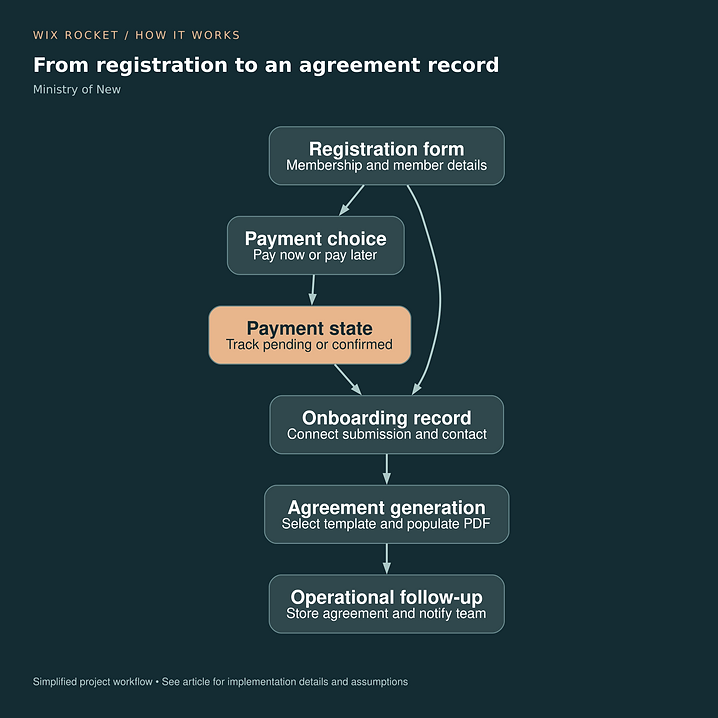
For Ministry of New, registration data fed different agreement templates for teams and individual membership types. Agreement records connected the output back to the registration. The diagram shows that onboarding context; template versioning and retry policies above are recommendations for similar builds.
Read the Ministry of New case study.

Test the awkward answers
Use long names, multiline addresses, missing optional fields and several selected plans. Inspect the actual PDF for wrapping, blank sections and page breaks. Generating a file successfully does not mean its contents are readable.
Document preparation and electronic signing are separate capabilities. If signing is required, include it explicitly in the workflow. Wix Rocket can help map the form, template and handover before development begins.