
Wix Multilingual: Why Is My Dynamic Content Still in English?
18 August 2026 · 3 min read
Troubleshoot untranslated Wix CMS content by checking collection eligibility, language context, custom queries and missing-translation behaviour.
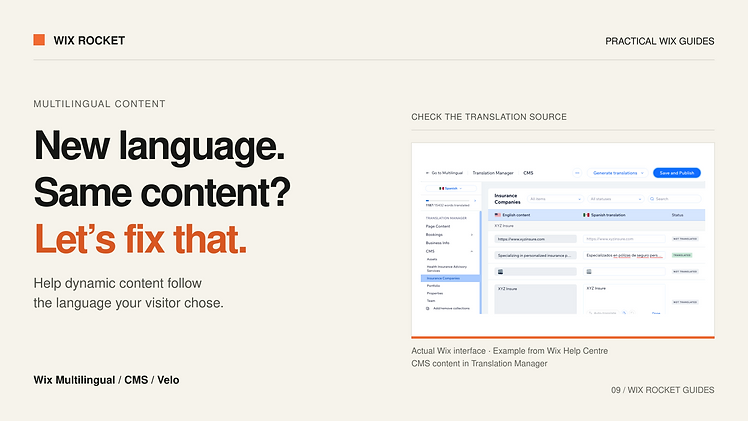
The navigation changes language, but the main description does not. That usually means the language selector and the content-loading path are doing different jobs.
Before adding custom code, check whether the content is using Wix's native CMS translation support correctly. If the page loads data through custom logic, follow that path separately. This guide gives you a practical order for investigating both.
Check where the untranslated text comes from
Is it ordinary editor text, a CMS-connected field, a hard-coded string or a response from an external service? Similar-looking elements can have completely different sources.
Make a short inventory of the affected title, description, caption and button. Note how each is populated. This prevents changing dataset settings for content that is actually inserted by code after the dataset loads.
Also check whether the issue occurs on every record or only some items. A single incomplete translation points to a different problem from every custom query returning the primary-language content.
Verify native CMS translation setup
Wix Multilingual supports translating eligible CMS collections through Translation Manager. Its current guidance lists Text, Rich Content, Rich Text, Image and URL fields among the supported types. Collections added after Multilingual setup may need to be added manually to Translation Manager.
Check the collection's eligibility, whether it appears in Translation Manager and whether the specific field and record have translated content. Confirm that the page element is connected to the expected source, then check the published language version.
Do not duplicate every collection into language-specific copies before checking this route. Native translation can avoid maintaining parallel data structures when it meets the requirement.
Trace the language used by custom logic
For Velo code, Wix exposes the current display language through the multilingual API. That is different from the site's main language. A query driven by the main language can keep returning primary-language content after the visitor switches languages.
Inspect the language value at the moment content is requested, along with any cache key. If a custom cache ignores language, one translated response can be reused in the wrong context.
The exact query or dataset fix depends on the site's content model. Reading the correct language is necessary, but it does not automatically translate an external API response or a hard-coded sentence.
Use a custom translation model only for a clear need
Some integrations need language-specific records or fields because they consume an external translation system or an existing bespoke schema. If so, connect versions using a stable content identifier, not a translated title.
Define how editors add a new language and how the application finds its corresponding content. Also agree whether images, downloads and destination links vary by language. A translated description with an untranslated attached document may still be an incomplete experience.
These are optional architecture patterns, not prerequisites for every multilingual Wix site.
Choose a missing-translation policy
When a translation is absent, decide whether to show a clearly identified fallback, hide an optional section or withhold that language version. Apply the rule consistently rather than leaving each component to invent its own response.
For custom asynchronous loading, consider rapid language changes. An older request should not overwrite content fetched for the most recent selection. Test refreshes and direct links as well as the language-switcher button.
A project example: custom dataset behaviour
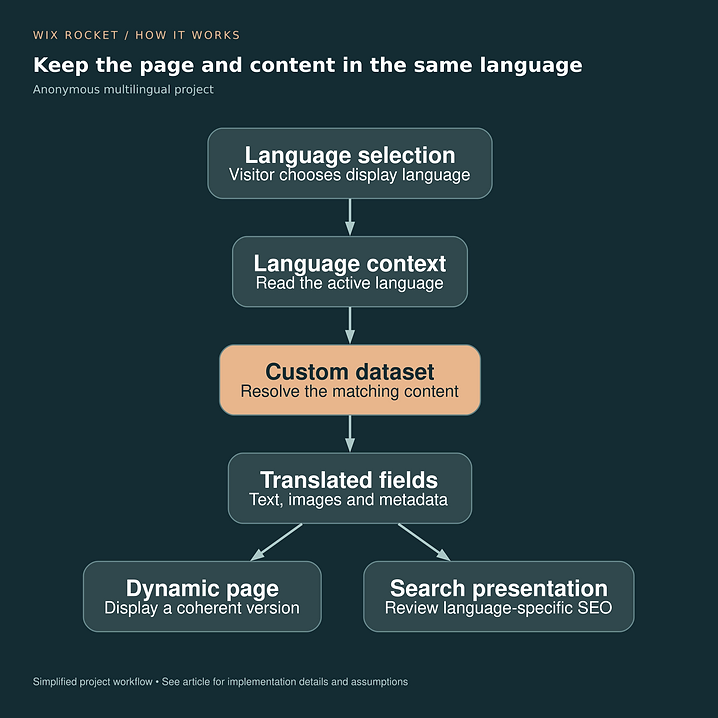
In an anonymous Wix project, we coordinated custom dataset logic with Wix Multilingual to keep dynamic content aligned with the selected language. The diagram shows that particular arrangement, rather than implying native CMS translation always requires custom code.

Check the complete language experience
Review visible content, image alternatives, page title, description and links in each published language. For a custom frontend, verify its locale URLs and metadata separately from the Wix content settings.
Wix Rocket can help trace where the language context is lost and choose the smallest fix that makes the page consistent.