
Free Shipping on Wix: When Do You Need Custom Rules?
25 August 2026 · 3 min read
Compare native Wix shipping regions, order thresholds and coupons with custom shipping logic, then test the rule against real checkout scenarios.
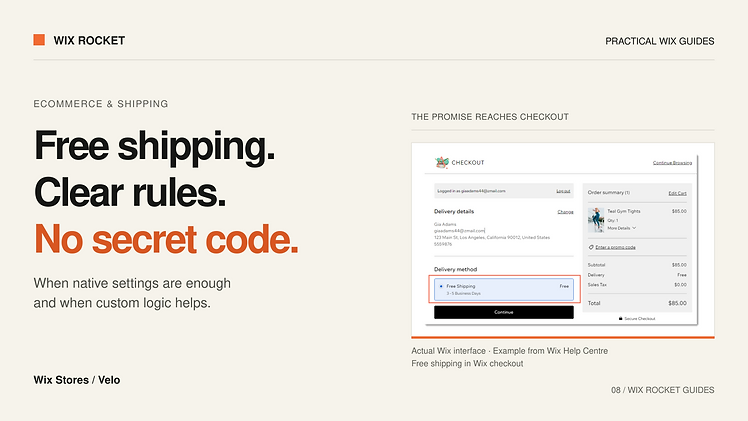
“Free shipping” is a short promise with several possible meanings. It might apply to every order, selected destinations, orders above a threshold or a temporary promotion. Your checkout needs the precise version.
Wix provides native shipping configuration, so custom development should start with a rule the existing settings cannot adequately express. Here is how to work out which route fits your store.
Write the policy before configuring the checkout
Specify the destination, eligible products, order threshold and delivery method. Also decide whether express delivery remains paid and whether the policy continues after another discount changes the order total.
For example, “free standard shipping to selected countries above the agreed threshold” is more useful than “free international shipping”. It identifies the questions that need configuration and testing without implying every destination or service is covered.
Keep the customer-facing wording aligned with those rules. A banner promising something broader than checkout allows creates a support problem, even when the calculation is technically correct.
Check the built-in options first
Wix documents free-shipping rules for shipping regions, threshold-based options and free-shipping coupons. A regional rule can make free shipping available without asking the customer to enter a code. A coupon serves a different purpose when redemption of a promotion is part of the offer.
Review all relevant delivery regions and their active rates. Wix notes that customers cannot purchase when their region has no applicable shipping, delivery or pickup rule. Removing an unwanted rate without replacing the needed coverage can therefore block checkout.
If native configuration expresses the policy clearly, it is usually easier for the store team to maintain than bespoke code.
Identify the specific gap before going custom
Custom calculation may be worth evaluating when eligibility depends on additional business data or a combination of conditions that the available configuration cannot represent. Write a decision table and test the native setup against it before assuming a plugin is required.
Wix's shipping-rates service plugin is one documented route for providing custom rates. Its request and response contract must be checked against the store's intended flow. A custom rate calculation does not remove the need to understand other active delivery options.
For a destination-based policy, use the delivery destination involved in checkout. A customer's browsing location may be unrelated: someone in New Zealand can order a gift for a recipient overseas.
Decide what happens when information is incomplete
An unfinished address may not contain enough information to calculate a rate. An unsupported destination needs a deliberate response. Do not silently interpret either situation as free delivery.
If a custom rate provider is unavailable, define the operational fallback with the store owner. The right outcome may be a configured backup rate or a request to try again; it depends on what the business is willing to fulfil.
Keep checkout labels clear enough to distinguish standard free delivery from a paid express option. Multiple valid rates should not look like contradictory promises.
A project example: an international offer
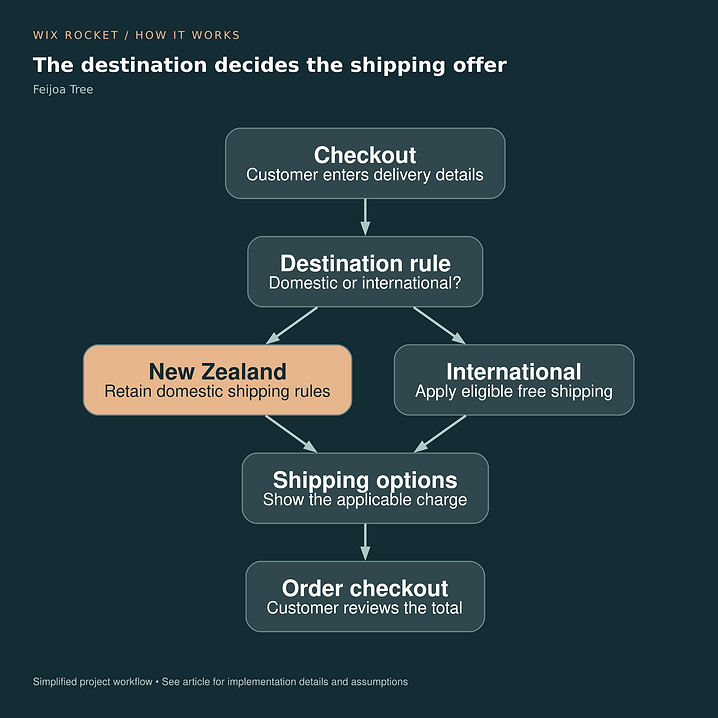
Feijoa Tree's requirement was an automatic international free-shipping offer while retaining domestic rules. That project illustrates the need to isolate the changed condition. It does not establish that every international offer needs code, or identify the exact extension used in that delivery.
Read the Feijoa Tree case study.

Test the boundaries, not just one eligible order
Try domestic and international addresses, an unsupported destination, an incomplete address and a cart that changes after a rate appears. For thresholds, test immediately below, exactly at and above the boundary, then apply any relevant discount.
Check the final order's shipping charge as well as the displayed message. Wix Rocket can help assess your rule against the native options and scope custom work only where the checkout needs it.